Foundry — Storage Conveyor Control
Stop a conveyor when storage is full, restart when it drops to a lower level (hysteresis circuit using Data Cables)
Wiring Diagram
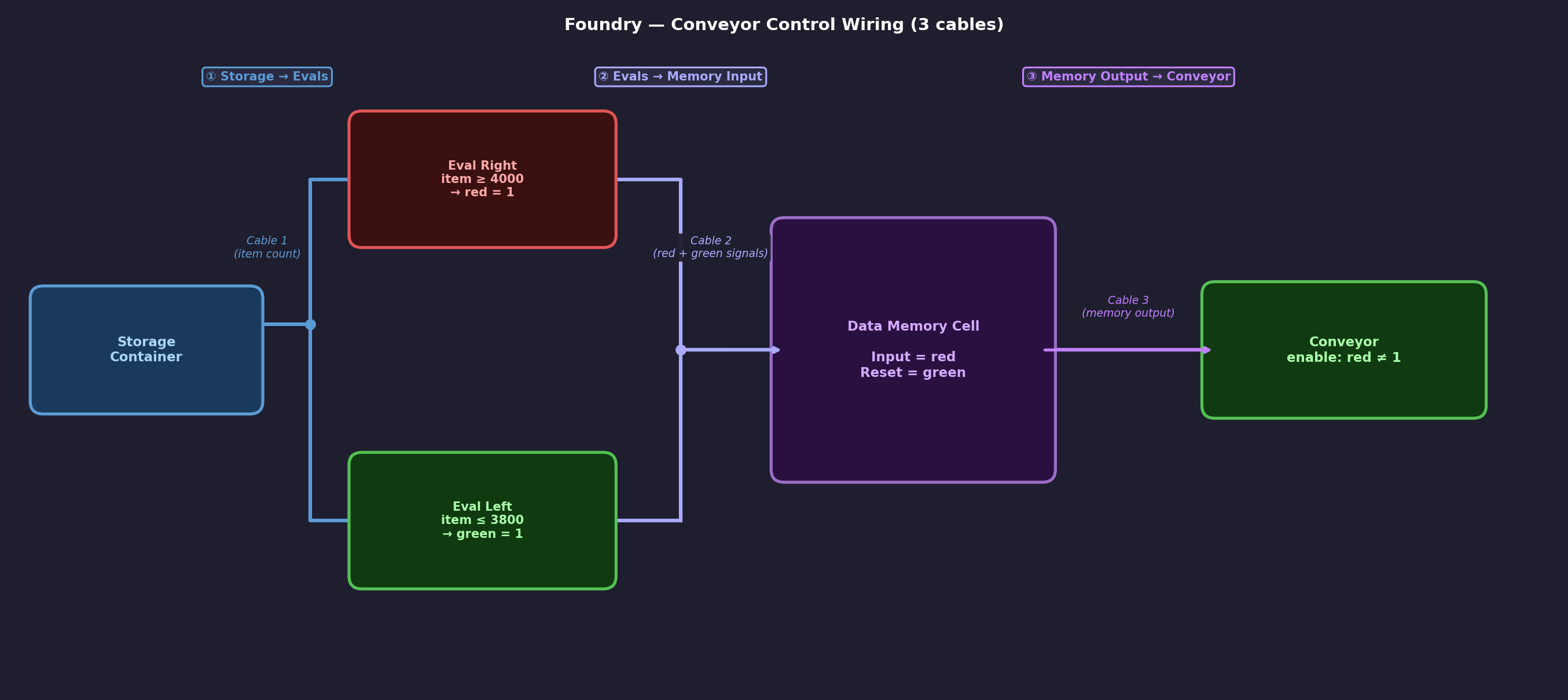
Overview
This circuit uses two evaluators and a data memory cell to create hysteresis — the conveyor stops when storage hits the upper threshold and only restarts when it drops to the lower threshold. Without the memory cell, the conveyor would flicker on and off around the threshold.
Storage → Cable 1 → Eval1 + Eval2 → Cable 2 → Memory Cell → Cable 3 → Conveyor
Component Configuration
📦 Storage Container
- Connect Cable 1 to the storage unit
- Note: the data connector is only in one corner — make sure to attach the cable there specifically
- The container automatically broadcasts item counts as signals when cabled
Eval 1 Restart / low threshold
- Condition: item <= [low threshold] (e.g. 3800)
- Output: green constant = 1
- Fires when storage drains — triggers memory cell reset
Eval 2 Stop / high threshold
- Condition: item >= [high threshold] (e.g. 4000)
- Output: red constant = 1
- Fires when storage is full — latches the memory cell
🧠 Data Memory Cell
- Input: red — store the stop signal
- Output: red — broadcast stored value on output network
- Reset: green — clear stored value when Eval 1 fires
- Both Eval 1 and Eval 2 share Cable 2 into the single input port
- Cable 3 connects the output port to the conveyor
🏭 Conveyor
- Enable based on condition: red != 1
- Runs when no signal (memory cell empty) → conveyor on
- Stops when memory cell broadcasts red = 1 → conveyor off
Key Gotchas
⚠️ Memory cell Output slot must be explicitly set
If the Output slot is left blank, the memory cell stores values internally but broadcasts nothing on the output network. Set it to the same signal type as the Input (e.g. red).
⚠️ Input and Output are separate physical ports
Cable 2 (from evals) goes into the input port. Cable 3 (to conveyor) goes from the output port. They are on opposite sides of the memory cell — don't connect both to the same port.
⚠️ Storage connector location
The data cable connector on a storage container is only in one specific corner. Make sure to cable from that corner or the container won't broadcast its item count.
⚠️ Signal values are additive
If two devices broadcast the same signal type on the same network, their values are summed. Avoid putting conflicting signals on the same cable network.